
관리 메뉴

choco's story
CSS 03. 텍스트(폰트) 꾸미기 본문
텍스트 속성 정리
font-family
font-family란?
: 요소를 구성하는 텍스트의 글꼴을 정의하는 속성 (글꼴명 = 속성값)
font-family는 여러 글꼴을 정의할 수 있는데, 이는 글꼴 사이의 우선순위를 지정하여 정의하는 것입니다.
ex)
*{
  font-family: Times, monospace, serif;
}
=> Times 글꼴이 1순위, 만약 이 글꼴이 없다면 후순위로 monospace 글꼴 사용
font-family 사용 예시
<!doctype html>
<html lang="en">
  <head>
    <meta charset="UTF-8" />
    <meta name="viewport" content="width=device-width, initial-scale=1.0" />
    <title>텍스트 꾸미기</title>
    <style>
      * {
        /* monospace 글꼴이 없는 경우엔 serif로 대체 */
        font-family: monospace, serif;
      }
    </style>
  </head>
  <body>
    <h1>h1 제목 테스트</h1>
    <p>기본 p 태그 영역 테스트</p>
  </body>
</html>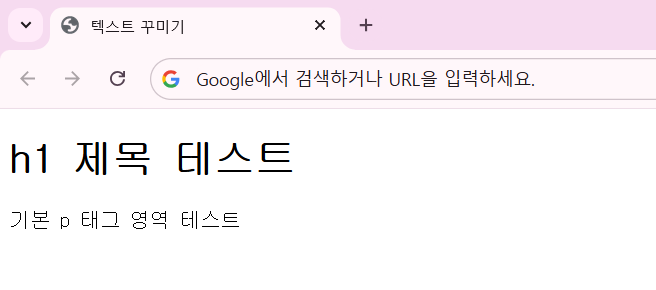
monospace 글꼴인 경우
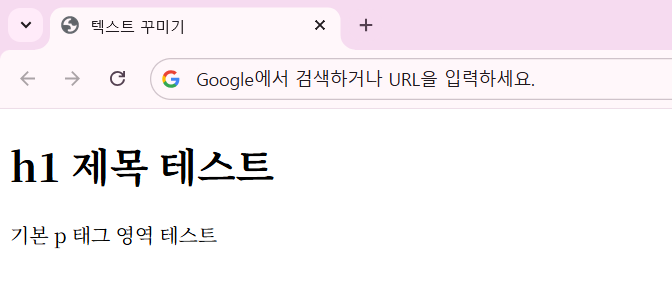
serif 글꼴인 경우
font-size
css에서는 수치와 단위를 지정해 텍스트 크기를 정의할 수 있습니다.
  => font-size
아래 표는 css의 font-size 단위입니다.
| 단위 | 의미 |
|---|---|
|  px | 모니터 상 화소 하나 크기에 대응하는 절대 단위 |
|  rem | html 태그의 font-size에 대응하는 상대 단위 |
|  em | 부모 요소(태그)의 font-size를 기준으로 하는 상대 단위    |
ex)
span{ font-size: 16px; }
span{ font-size: 2rem; }
span{ font-size: 1.5em; }
font-size 사용 예시
<!doctype html>
<html lang="en">
  <head>
    <meta charset="UTF-8" />
    <meta name="viewport" content="width=device-width, initial-scale=1.0" />
    <title>텍스트 꾸미기</title>
    <style>
      * {
        /* monospace 글꼴 없는 경우엔 serif로 대체하는 명령어 */
        font-family: monospace, serif;
      }
      /* html 태그는 루트 요소 */
      html {
        font-size: 18px;
      }
      /* rem : html이 18px이니, 2rem = 18 * 2, 1rem = 18 * 1 */
      h1 {
        font-size: 2rem;
      }
      p {
        font-size: 1rem;
      }
      span {
        font-size: 4em;
      }
    </style>
  </head>
  <body>
    <h1>h1 제목 테스트</h1>
    <p>기본 p 태그 텍스트 <span>p 태그 인라인 영역 테스트</span></p>
  </body>
</html>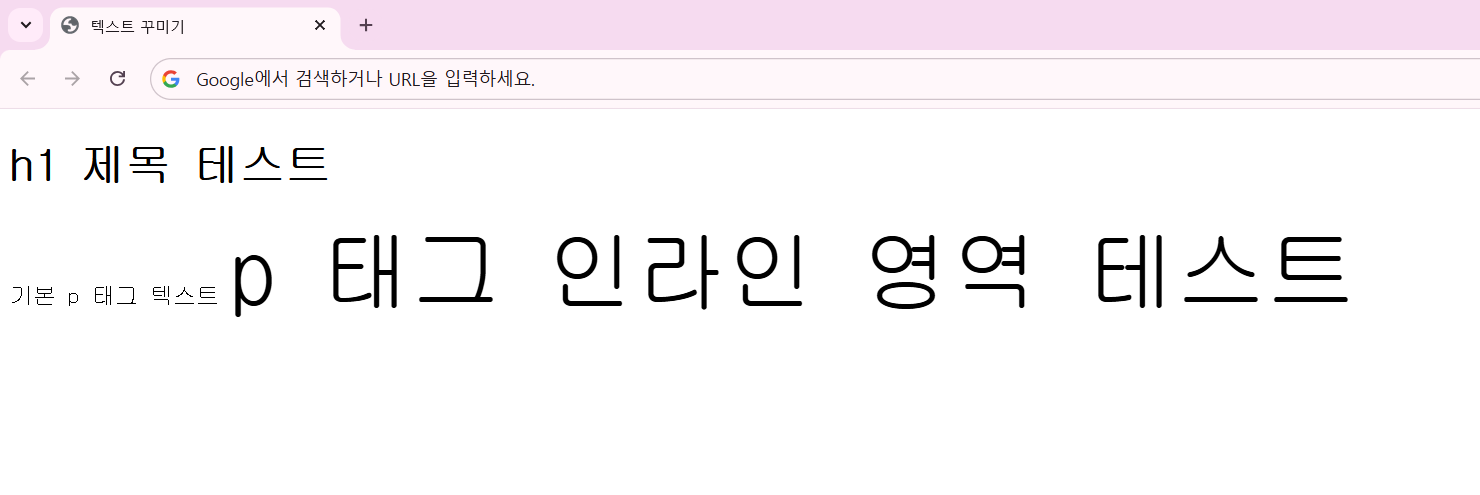
html 태그의 font-size는 18px, 이는 루트 요소니까 상대 단위인 rem, em의 기준이 됩니다.
h1 태그는 2rem이니 18 * 2 = 32px,
p 태그는 1rem이니 18 * 1 = 18px,
span 태그는 부모 요소가 p 태그이니 p 태그의 18px가 기준이 됩니다.
즉 4em = 4 * 18 = 72px 입니다.
text-align
css에서는 블록 내에서 텍스트의 정렬 방식을 정의합니다.
(미리 정의된 키워드 값을 지정)
아래 표는 정렬 방식의 종류입니다.
| 속성값 | 의미 |
|---|---|
|  left / right |  왼쪽, 또는 오른쪽 정렬 |
|    center |  가운데 정렬 |
|    justify |  양 끝 정렬 (마지막 줄 제외)    |
ex)
p{ text-align: right; }text-align 사용 예시
<!doctype html>
<html lang="en">
  <head>
    <meta charset="UTF-8" />
    <meta name="viewport" content="width=device-width, initial-scale=1.0" />
    <title>텍스트 꾸미기</title>
    <style>
      .left {
        text-align: left;
      }
      .right {
        text-align: right;
      }
      .center {
        text-align: center;
      }
      .justify {
        text-align: justify;
      }

      /* p 태그 스타일 지정 */
      p {
        background-color: gainsboro;
        height: 25px;
      }
      /* span 태그 스타일 지정 */
      span {
        font-size: 36px;
        color: red;
      }
    </style>
  </head>
  <body>
    <p class="left">왼쪽 정렬 (기본값)</p>

    <p class="right">오른쪽 정렬</p>

    <p class="center">가운데 정렬</p>

    <p class="justify">
      양 끝 정렬 Lorem ipsum dolor sit amet, consectetur adipiscing elit, sed do eiusmod tempor
      incididunt ut labore et dolore magna aliqua. Ut enim ad minim veniam, quis nostrud
      exercitation ullamco laboris nisi ut aliquip ex ea commodo consequat. Duis aute irure dolor in
      reprehenderit in voluptate <span>velit esse cillum dolore</span> eu fugiat nulla pariatur.
      Excepteur sint occaecat cupidatat non proident, sunt in culpa qui officia deserunt mollit anim
      id est laborum.
    </p>
  </body>
</html>
여기서 justify는 텍스트가 양 끝에 딱 맞게 정렬되는 것을 볼 수 있습니다.
color
| 속성값 | 의미 |
|---|---|
|  키워드 |  미리 정의된 색상 키워드 사용 ex) red, green ... |
|  RGB 색상 코드 |  # + 여섯 자리 16진수 형태로 색상 지정 |
|  RGB 함수 |  Red, Green, Blue의 값을 각각 정의해 색상 지정 (%값)   |
ex)
span{ color: red; }
span{ color: #FF0000; }
span{ color: rgb(100%, 0%, 30%); }'HTML & CSS > CSS' 카테고리의 다른 글
| CSS 05. 박스 모델 (Box-Model) - 1 (0) | 2026.05.09 |
|---|---|
| CSS 04. display, border (0) | 2026.05.09 |
| CSS 02. 선택자 - 기본 선택자, 그룹 선택자 (0) | 2026.05.03 |
| CSS 01. CSS 기본 문법 (0) | 2026.04.25 |
| CSS 시작 (0) | 2026.04.25 |